💡What You'll Learn
- Difference between UI and UX design
- Best UI/UX practices for 2025
- Common design dos and don’ts
- Latest UI/UX trends to watch
- How to build user-loved experiences
In today’s digital-first world, a product’s success isn’t measured solely by its features it’s measured by the experience it delivers. Users don’t just interact with apps and websites they feel them. A confusing interface, slow navigation, or poor accessibility can turn even the best product into a frustrating experience.
UI/UX design is more than just aesthetics it’s about creating experiences that connect, delight, and retain users. Whether you’re a startup founder, a product manager, or a designer, understanding the principles of UI/UX can dramatically improve your product’s performance.
In this guide, we’ll cover actionable tips, dos and don’ts, emerging trends, and answer common questions about UI/UX design that can help your digital product stand out in 2025.
Understanding the Difference: UI vs. UX
Before diving into tips, it’s important to distinguish between UI and UX:
- UX (User Experience) focuses on how users interact with a product. It’s about usability, accessibility, and the overall journey. Questions UX designers ask include: Can users achieve their goals efficiently? Does the product feel intuitive?
- UI (User Interface) focuses on how the product looks and feels visually. It deals with buttons, typography, colors, spacing, and consistency.
- Think of UX as the blueprint of a house how rooms connect, how easy it is to move around while UI is the interior design that makes the space visually appealing and comfortable. Both must work in harmony to create a product that users love.
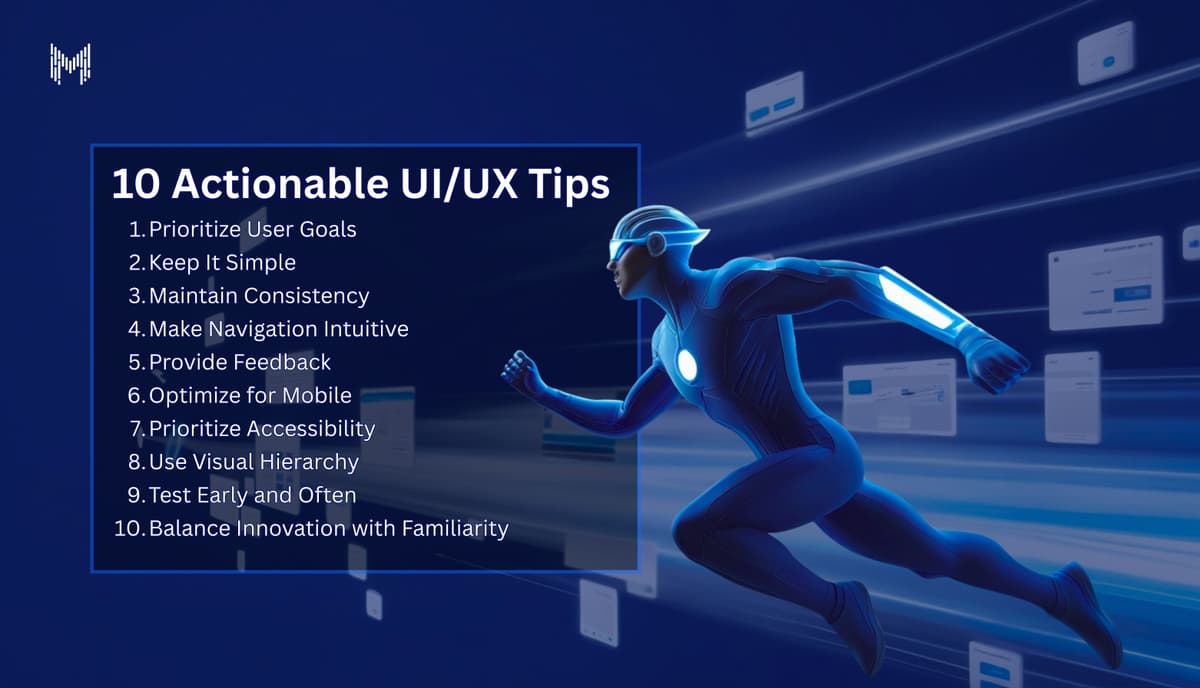
10 Actionable UI/UX Tips
- Prioritize User Goals
Always design with the user’s goals in mind. Features are meaningless if they don’t help users accomplish what they came to do.
Tip: Conduct user research and create personas to understand what matters most to your audience. - Keep It Simple
Complexity is the enemy of usability. Minimalist design isn’t about removing features—it’s about removing distractions.
Tip: Use the “less is more” approach every element on a screen should serve a purpose. - Maintain Consistency
Consistency in fonts, colors, button styles, and layout builds familiarity and trust. Inconsistent designs confuse users and reduce credibility.
Tip: Create a design system or style guide early to ensure uniformity across the product. - Make Navigation Intuitive
Users should never feel lost. Navigation should be predictable and straightforward, whether it’s a website menu or mobile app tabs.
Tip: Test navigation with real users and observe how quickly they find key features. - Provide Feedback
Users need to know their actions worked. Loading indicators, success messages, or micro-interactions can reassure users and enhance engagement.
Tip: Even subtle animations, like a button hover effect or progress bar, can improve user satisfaction. - Optimize for Mobile
With mobile traffic dominating the web, mobile-first design isn’t optional. Responsive layouts, touch-friendly elements, and fast load times are essential.
Tip: Test designs on multiple devices and screen sizes. - Prioritize Accessibility
Design isn’t just for some users it’s for everyone. Accessible design ensures that people with disabilities can navigate your product effortlessly.
Tip: Use readable fonts, proper contrast ratios, and ensure keyboard navigation works seamlessly. - Use Visual Hierarchy
Guide users’ attention to what matters most. Size, color, spacing, and placement can emphasize primary actions or content.
Tip: Highlight calls-to-action with bold colors or larger buttons, but avoid overwhelming users with too many visual cues. - Test Early and Often
Prototypes and user testing help catch friction points before launch. Observing real users interact with your product uncovers insights that designers often miss.
Tip: Conduct usability tests regularly, even with simple wireframes. Iteration is key. - Balance Innovation with Familiarity
Innovation is great, but don’t reinvent the wheel for standard interactions. Users expect familiar patterns, especially for navigation and core actions.
Tip: Introduce new features gradually and always provide cues to guide users.
Dos and Don’ts of UI/UX Design
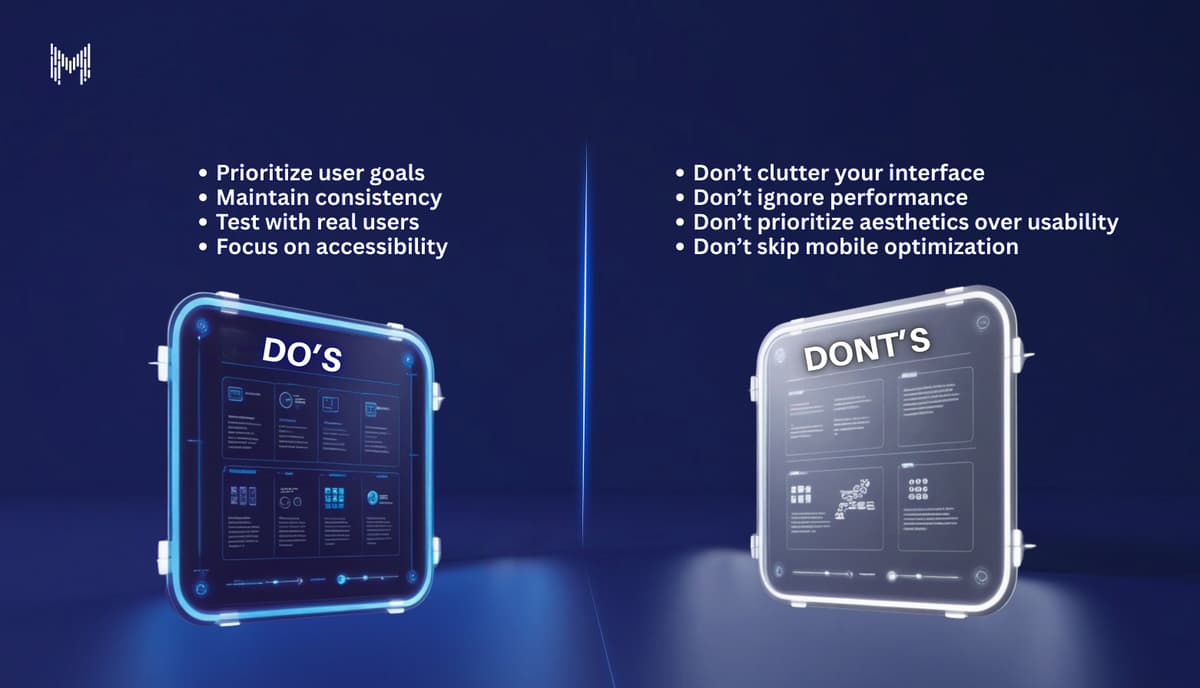
✅ Dos:
- Do focus on user goals before aesthetics.
- Do maintain a consistent design system across screens.
- Do test with real users and iterate based on feedback.
- Do make the product accessible to all users.
- Do provide meaningful feedback for every interaction.
❌ Don’ts:
- Don’t overload screens with unnecessary elements.
- Don’t rely solely on your instincts—user research is essential.
- Don’t ignore performance; slow apps frustrate users.
- Don’t sacrifice clarity for creativity.
- Don’t forget mobile-first design in 2025.
Emerging UI/UX Trends to Watch in 2025
Keeping up with trends helps your product feel modern without sacrificing usability:
- 1. Micro-interactions – small animations that guide, delight, and provide feedback.
- 2. Dark mode and adaptive themes – improving readability and user comfort.
- 3. Voice interfaces and conversational UI – designing experiences for voice commands.
- 4. AI-assisted personalization – adapting UI elements and suggestions based on user behavior.
- 5. Inclusive design – designing products that cater to diverse abilities, languages, and cultures.
Why Choose Mkaits Technologies for UI/UX Design?
Choosing the right partner for UI/UX design can make or break your product. At Mkaits Technologies, we bring a unique blend of creativity, technical expertise, and user-centric thinking:
- Tailored Solutions: Every product is unique. We create custom designs that align with your brand and user needs.
- Data-Driven Design: Our design decisions are backed by research, analytics, and real user insights.
- End-to-End Support: From wireframes to high-fidelity designs and user testing, we handle it all.
- Focus on Results: Our designs aren’t just pretty they drive engagement, retention, and business growth.
- ith Mkaits, you’re not just getting a UI/UX designer you’re getting a partner dedicated to creating experiences that delight users and scale your business.
At Mkaits Technologies, we combine strategy, creativity, and technology to craft UI/UX solutions that don’t just meet expectations they exceed them. After all, great design is about people, not pixels.
UI/UX design isn’t just about making things pretty it’s about making things work beautifully. By following best practices, applying actionable tips, avoiding common mistakes, and staying updated with trends, you can build digital products that users love and trust.